
Microphone — processed virtual mic
Inari captures a hardware microphone, runs it through a DSP chain, and publishes the result as a virtual microphone that other apps can select. Your raw mic stays untouched; everything downstream picks up the processed version.
hardware mic ─► gate ─► gain ─► compressor ─► limiter ─► Inari Mic (virtual)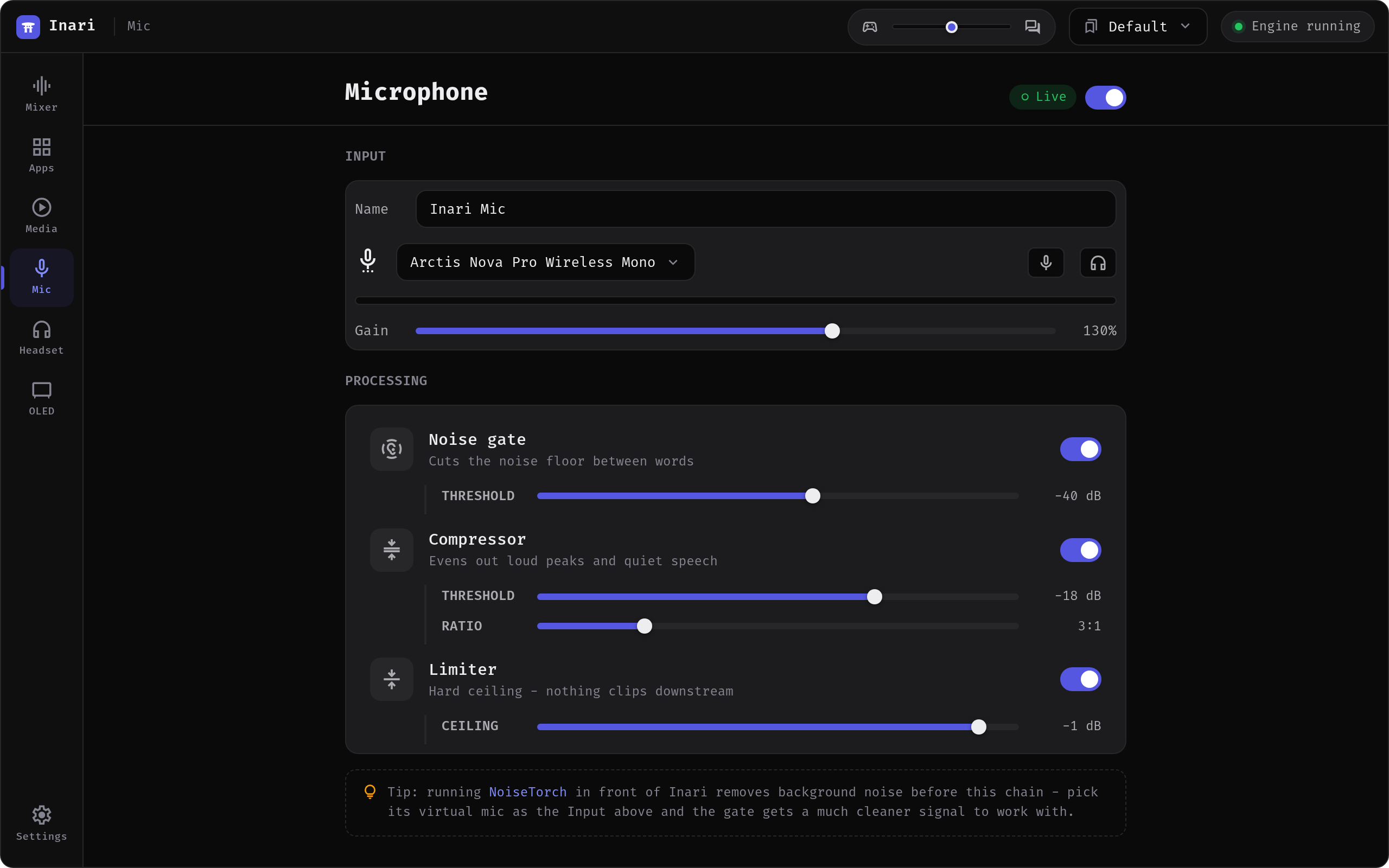
The chain runs on the native PipeWire engine, is off by default, and is switched on with the toggle in the screen header.
The virtual mic
The virtual microphone is published as Inari Mic — that is the name you pick in Discord, OBS, a browser or anything else. Rename it in the Name field (or by double-clicking the mic strip in the mixer) and other apps see the new name.
If you set a device naming style in Settings, it applies here too, so the mic can appear as Inari Mic (Inari) or Inari · Inari Mic.
Input picks which hardware microphone is captured — a specific device, or System default (which follows the default input you set in Settings).
Gain is a straight level control from 0 % to 200 %, with 100 % as unity. It sits after the gate, so raising it does not raise the noise floor the gate already closed on.
The mute button silences the virtual mic at the source, and the headphones button lets you listen to yourself — the processed signal on your default output, which is how you tune the chain. Wear headphones.
Processing
Each stage has its own on/off switch (all three are on by default) and reveals its parameters when enabled.
Noise gate
Cuts the noise floor between words — fan noise, keyboard hum, room tone.
| Parameter | Range | Default | What it does |
|---|---|---|---|
| Threshold | −80 to −10 dB | −40 dB | The gate opens above this level and closes below it. Raise it if quiet background noise gets through, lower it if the start of your words gets clipped off. |
Compressor
Evens out loud peaks and quiet speech, so you stay at a consistent level when you lean back or shout.
| Parameter | Range | Default | What it does |
|---|---|---|---|
| Threshold | −60 to 0 dB | −18 dB | Compression starts above this level; everything quieter passes through untouched. |
| Ratio | 1:1 to 10:1 | 3:1 | How hard the excess above the threshold is reduced. 3:1 means 3 dB in becomes 1 dB out. |
Limiter
A hard ceiling, so nothing downstream clips no matter what happens.
| Parameter | Range | Default | What it does |
|---|---|---|---|
| Ceiling | −12 to 0 dB | −1 dB | The absolute maximum level the virtual mic ever outputs. |
Attack, release and hold times are fixed at voice-chain values and are not exposed: the gate uses a 5 ms attack, 150 ms release and 200 ms hold; the compressor a 6 ms attack, 60 ms release and 4 dB of makeup gain; the limiter an instant attack and 60 ms release.
Noise suppression
Inari's gate silences the gaps between words but does not remove noise while you are talking. For that, run NoiseTorch in front of Inari and pick its virtual microphone as the Input above — the gate then gets a much cleaner signal to work with.