
Hotkeys — system-wide shortcuts
Settings → Hotkeys binds keys that work while another window has focus, so you can mute the mic mid-game without alt-tabbing.
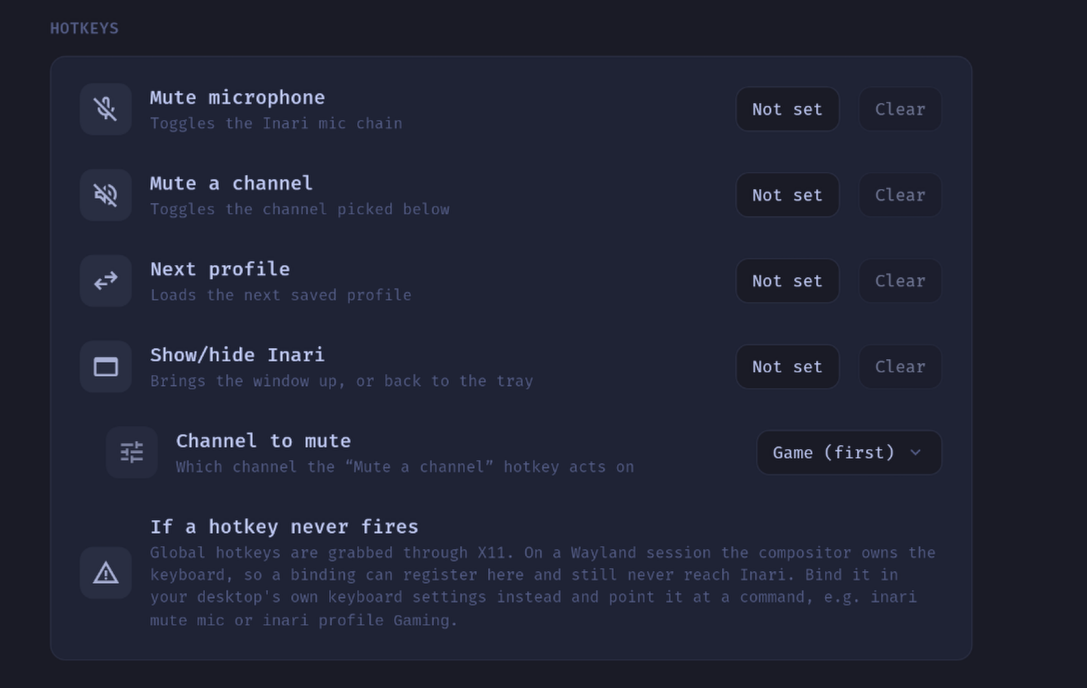
The four actions
| Action | What it does |
|---|---|
| Mute the microphone | Toggles the Inari mic chain |
| Mute a channel | Toggles one chosen channel |
| Next profile | Loads the next saved profile, wrapping around |
| Show / hide Inari | Reveals the window, or sends it back to the tray |
The channel-mute row has its own Channel to mute picker below it. If that channel is later renamed away or deleted, the binding falls back to the first channel rather than becoming a key that does nothing.
Nothing is bound out of the box
Every row starts at Not set, and that is deliberate: an app that grabs Ctrl+Shift+M on first launch — away from whatever else on your system wanted it — is being hostile. You opt in per action.
To bind one: click the button on the row and press the combination. While it is armed the capture eats every key press, so combinations the window would normally act on (Ctrl+W and friends) can be bound anyway. Esc leaves without changing anything, and Clear removes a binding. A combination the shortcut parser cannot understand is rejected on the spot rather than stored as a binding that could never register.
Bindings live in ~/.config/inari/prefs.json (see Configuration & files).
Wayland often refuses the grab
A binding can be saved, valid, and still never fire
Global shortcuts are grabbed through X11. On a Wayland session the compositor owns the keyboard, so the grab either fails outright or succeeds against XWayland and then never sees a key pressed in a native Wayland application.
Inari does not paper over this. When registration fails, the row is marked inactive and shows what the session said, instead of presenting a binding that looks healthy and is dead. The failure is not written to disk either — whether the OS grants a grab is a property of the session, not of your configuration, so the same prefs.json can work on an X11 login and not on a Wayland one.
What to do instead
Bind the key in your desktop's own keyboard settings and point it at Inari's command line, which works regardless of the compositor:
inari mute mic
inari mute chat
inari profile Gaming
GNOME: Settings → Keyboard → View and Customize Shortcuts → Custom Shortcuts. KDE: System Settings → Shortcuts → Add Command. The command acts on the already running Inari and — importantly for a shortcut you press mid-game — does not pop the window open. Full details in Command line.
Hotkeys are a desktop thing
The Hotkeys section does not appear on a paired tablet, and the hotkey commands are not on the remote's allowlist. A system-wide shortcut is a property of the PC and cannot be meaningfully configured from another device.
Related
- Command line — what a desktop shortcut can call
- Profiles — what "next profile" cycles through
- Settings — the rest of that screen