
Equalizer — per-channel parametric EQ
Every channel has its own parametric equalizer, applied in software by Inari's PipeWire engine. Open it with the tune button on a channel strip.
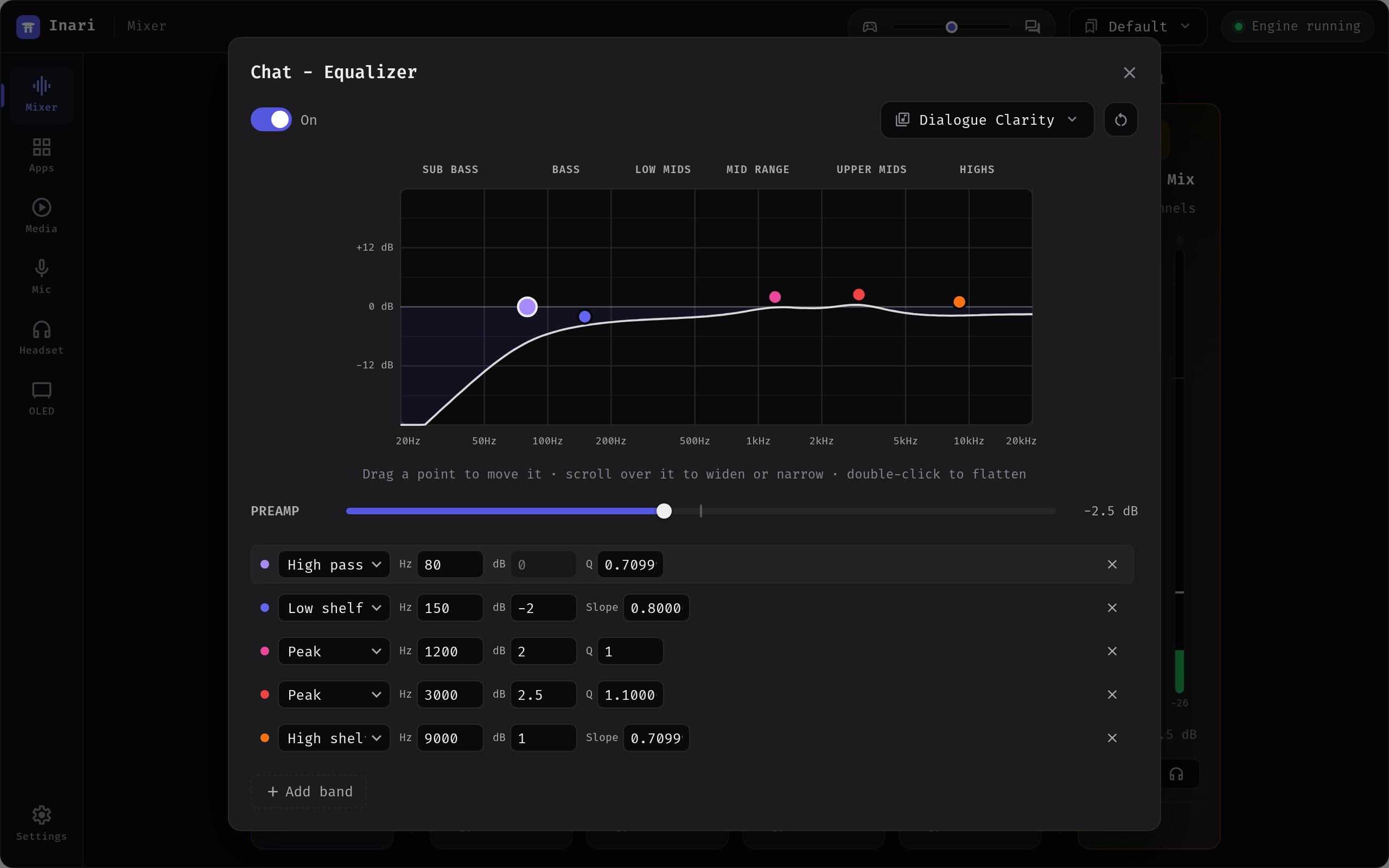
Not the same as the headset EQ
This is Inari's software EQ, one instance per channel — so your game can have a different curve than your music. The Arctis Nova Pro base station also has its own 10-band hardware EQ, which lives on the Headset page and applies to everything the headset plays. The two are independent and stack if you enable both.
The software EQ requires the native PipeWire engine; on the pactl fallback the editor says so and stays inactive.
Bands
A channel starts with a flat five-band layout — a low shelf at 100 Hz, peaking bands at 500 Hz, 1.5 kHz and 5 kHz, and a high shelf at 10 kHz. Add band extends this up to 10 bands.
Each band has a shape, a frequency, a gain and a Q:
| Field | Range | Notes |
|---|---|---|
| Shape | Peaking, Low shelf, High shelf, Low pass, High pass | |
| Frequency | 20 Hz – 20 kHz | |
| Gain | ±24 dB | Ignored by low pass / high pass |
| Q | 0.1 – 10 | Filter Q; on shelves this is the shelf slope |
Shelf slope is capped by the gain
On a shelf, slope and gain are not independent: past a certain combination the filter design has no stable answer, and the band would turn into an oscillator that keeps sounding after the audio stops. Inari clamps the slope to the steepest one the chosen gain supports — at ±8 dB that is around slope 10, at ±12 dB around 5, at ±24 dB around 2. Set a steeper slope than that and it is quietly limited; the curve you see is the curve you hear either way.
Before v1.0.13 this was not clamped, and a steep bass boost could produce a continuous tone above full scale until the setting was changed.
Above the band list sits a preamp (±24 dB) applied before the bands. Turn it negative when you boost a lot, so the channel does not clip.
On the response curve you can drag a point to move it, scroll over it to widen or narrow the band, and double-click it to flatten it. The reset button returns the channel to the flat five-band layout without touching the on/off switch.
Each band also draws its own thin curve underneath the summed response, so changing Q is something you can see rather than only hear, and the point you are dragging carries its frequency, gain and Q as a label. The dB axis spans ±12 dB and only opens up to ±24 when a curve actually needs the room — the loudest bundled preset stays under 9 dB, so a fixed ±24 scale drew most presets almost flat.
Presets
32 presets ship with Inari, from neutral references to genre and use-case curves: Flat, Acoustic, Bass Boost, Bright, Cinematic Movies, Classical, Competitive / Esports, Dialogue Clarity, Drum & Bass, Dubstep, EDM / Festival, FPS Footsteps, Hardcore / Uptempo, Hardstyle, Hip-Hop / Trap, Horror / Spatial, Immersive / Cinematic, Jazz, Late-Night, Lo-Fi, Podcast / Voice, Pop, Racing / Sim, Rock / Metal, Sub Boost, Techno, Trance, Treble Boost, V-Shape / Loudness, Vocal Clarity, Vocal Presence and Warm.
Applying a preset sets the bands and the preamp and switches the EQ on. The preset button names whichever preset the current curve matches exactly; edit any value and it falls back to Custom.
Type a name into the save box to keep the current curve as your own preset. Saved presets appear under Your presets and live as JSON files in:
~/.config/inari/eq_presets/Import and export
Export writes the channel's curve to a .json file in Inari's own preset format (schema 1) — the same format as the bundled presets, so an exported file can be shared and imported back.
Import accepts either format, pasted into the text box or picked as a file:
- Inari preset JSON — anything starting with
{. - AutoEq text — the plain-text parametric blocks published by the AutoEq headphone-correction project.
An AutoEq block looks like this, and this is exactly what the parser accepts:
Preamp: -6.0 dB
Filter 1: ON PK Fc 105 Hz Gain -2.4 dB Q 0.70
Filter 2: ON LSC Fc 105 Hz Gain 2.0 dB
Filter 3: ON HSC Fc 10000 Hz Gain -1.0 dB Q 0.71
Notes on the AutoEq import:
- Filter types
PK/PEQ/Modal,LS/LSC,HS/HSC,LP/LPQandHP/HPQare recognised; lines markedOFFand unknown filter types are skipped rather than failing the whole import. - A shelf line without
Qgets a slope of 0.71. - Only the first 10 filters are kept — AutoEq emits them in descending importance.
- Values outside the ranges above are clamped.
- An import lands as a preview: it fills in the bands and preamp but leaves the channel's on/off state alone.